Sharing & export
Three ways to get a result out of the workspace. They are not interchangeable: two give you data, one gives you an image.
| CSV | JSON | Result card | |
|---|---|---|---|
| Contents | The trials you can currently see | The complete run | One image summarising the run |
| Honours active filters | Yes | No | No |
| Format | Table | Structured | PNG, 2160 × 3840 |
| Good for | Spreadsheet analysis | Re-analysing offline | Posting, reporting, a commit message |
CSV and JSON
The classic exports, and they behave differently in one way that matters:
The result card
A single PNG rendered client-side from the current optimizer run — a portrait image sized for posting to a chat or an issue.
| Property | Value |
|---|---|
| Format | PNG only |
| Logical size | 1080 × 1920 (9:16) |
| Rendered at | 2160 × 3840 (2× scale) |
| Renderer | Hand-laid-out canvas, not a DOM screenshot |
| Generated | Only when you ask for it — never on load or run-finish |
| Network | None |
Why a hand-drawn canvas rather than a DOM screenshot
A DOM-to-image library would capture whatever the page happens to look like at that moment — which means the card would change with window size, light/dark theme and whether web fonts had finished loading, and would inherit whatever the UI decides to show.
Drawing the card explicitly instead makes the output deterministic: same run, same card. That is also why the palette is read from the share module’s own configuration rather than from the app’s CSS variables — the card looks the same whatever theme you are using.
Where the button lives
| Surface | Desktop | Phone |
|---|---|---|
| Optimizer results | Inside the Result actions kebab (⋮) | Same kebab |
| Analysis toolbar | Flat Share card button | Analysis actions kebab |
| Detached results window | Flat Share card button | — |
If no completed run is loaded, the action is not disabled — clicking it tells you so instead.
What is on the card
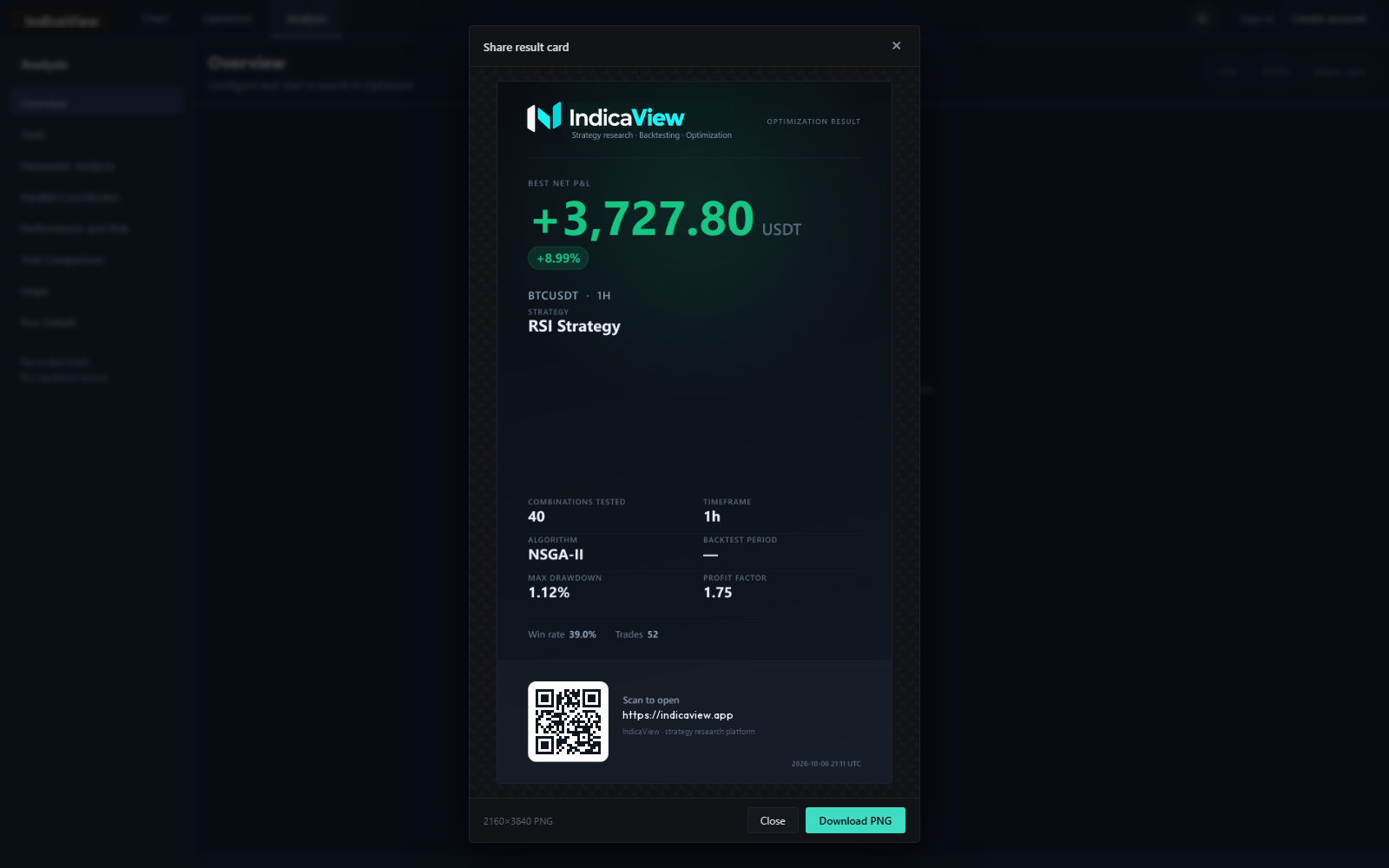
A projection of the optimizer run, not of a single backtest. Reading top to bottom:
- Header — brand tile, product name, tagline, and either
OPTIMIZATION RESULTorOPTIMIZATION IN PROGRESS. - Hero — the best net P&L, its unit as a separate suffix, and a return chip.
- Instrument — symbol and timeframe.
- Strategy — the strategy name. The whole block is omitted when there isn’t one.
- Equity curve — only when the snapshot carries one.
- Meta grid — combinations tested, algorithm, max drawdown, profit factor, timeframe and backtest period.
- Performance strip — win rate, trades, Sharpe.
- Footer — a QR code, the landing URL, and a UTC timestamp.
What is deliberately never on the card
This is a whitelist, not a blacklist, and the renderer throws if anything unexpected reaches it.
Never exported, at any verbosity: your Pine source, the winning run’s parameter values, per-trial rows, and the internal derived structures.
This is deliberate. A parameter list is the kind of detail that makes a shared card effectively a claim somebody else could act on, and a long parameter list is the least readable thing on any image. It also means a 20-parameter run and a 1-parameter run produce structurally identical cards.
Numbers and labels
Two conventions were fixed deliberately, because getting them wrong makes a card look wrong:
| Field | Rule |
|---|---|
| P&L unit | Matched from the symbol’s quote asset and drawn as a muted suffix, never glued to the figure and never as $ — BTCUSDT shows USDT, falling back to USDT when it can’t be determined |
| Timeframe | Resolved from the live picker first (so your custom timeframes print correctly), then a built-in label table, then a bare-minute reading. Unrecognised input is left unchanged rather than guessed |
| Algorithm | Friendly names — grid prints “Grid Search”, nsga2 prints “NSGA-II” |
| Backtest period | MM/YYYY–MM/YYYY, collapsing to a single month when both ends share one |
| Missing metric | An em dash — never zero |
| Infinite profit factor | ∞ |
| Numbers | Always en-US formatting, whatever your browser locale is |
Why the footer is hardcoded, and what that costs you
Nine of the ten configurable strings on the card — product name, tagline, landing URL, QR caption, brand mark, the whole palette and the card geometry — come from the share module’s configuration and can be overridden before the script loads.
The exception is the footer line, which is a literal in the renderer. Override the product name and the header changes while the footer still reads the old name. If you rebrand, that line needs a code change.
Saving it
Clicking the action renders the card, then opens a preview dialog showing the real PNG at full size, with the actual dimensions printed in the footer.
| Action | Effect |
|---|---|
| Download PNG | Saves the file, shows a confirmation, closes the dialog |
| Close, the ×, the backdrop, or Esc | Discards it, with no side effect |
The file is named indicaview-result-<UTC timestamp>.png — for example
indicaview-result-2026-10-06T12-00.png.
A dead QR code aborts the export on purpose
The QR target is validated before anything is drawn. It must be an absolute http(s) URL with a dotted host, and unfilled placeholders are rejected.
If it fails, the export stops with a message telling you to set the landing URL. The reason is that a scannable but dead QR code is invisible in a finished image: it looks deliberate, it scans, and it takes someone to a 404. A visible error at export time is better than a broken promise baked into a picture.
The QR code
Encoded by a small hand-written encoder bundled with the share module — no QR library is loaded at runtime. It targets the configured landing URL and captions itself “Scan to open”.
Known limitations
Be aware of these before relying on the card.
Four more that matter less, but are real: the preview’s image object URL is not revoked after the dialog closes; a run reloaded from browser storage typically has no equity series, so the curve and its label are both omitted; a run still in progress is labelled “so far” rather than hidden; and there is no automated check that the QR in the exported PNG actually decodes, so that claim rests on a one-off manual verification rather than a regression test.
Related
- Optimizer — where the run being exported comes from.
- Analysis — the second surface with an export control.
- Mobile — how the export controls collapse into kebab menus.
- Storage & persistence — where the run lives until you export it.